Get started
Open Machine Docs
Connect the computers you use, so a coding agent on one can work on the others with the permission you choose.
Open Machine connects the computers you use. A coding agent on one of them, such as Claude Code, Codex or Cursor, works on another by its name, with ssh <name>.om. On each machine you choose what agents may do, and the machine itself enforces it. No ports are opened and nothing runs in the cloud.
New here? The Quickstart connects two machines in about five minutes.
#The idea in one picture
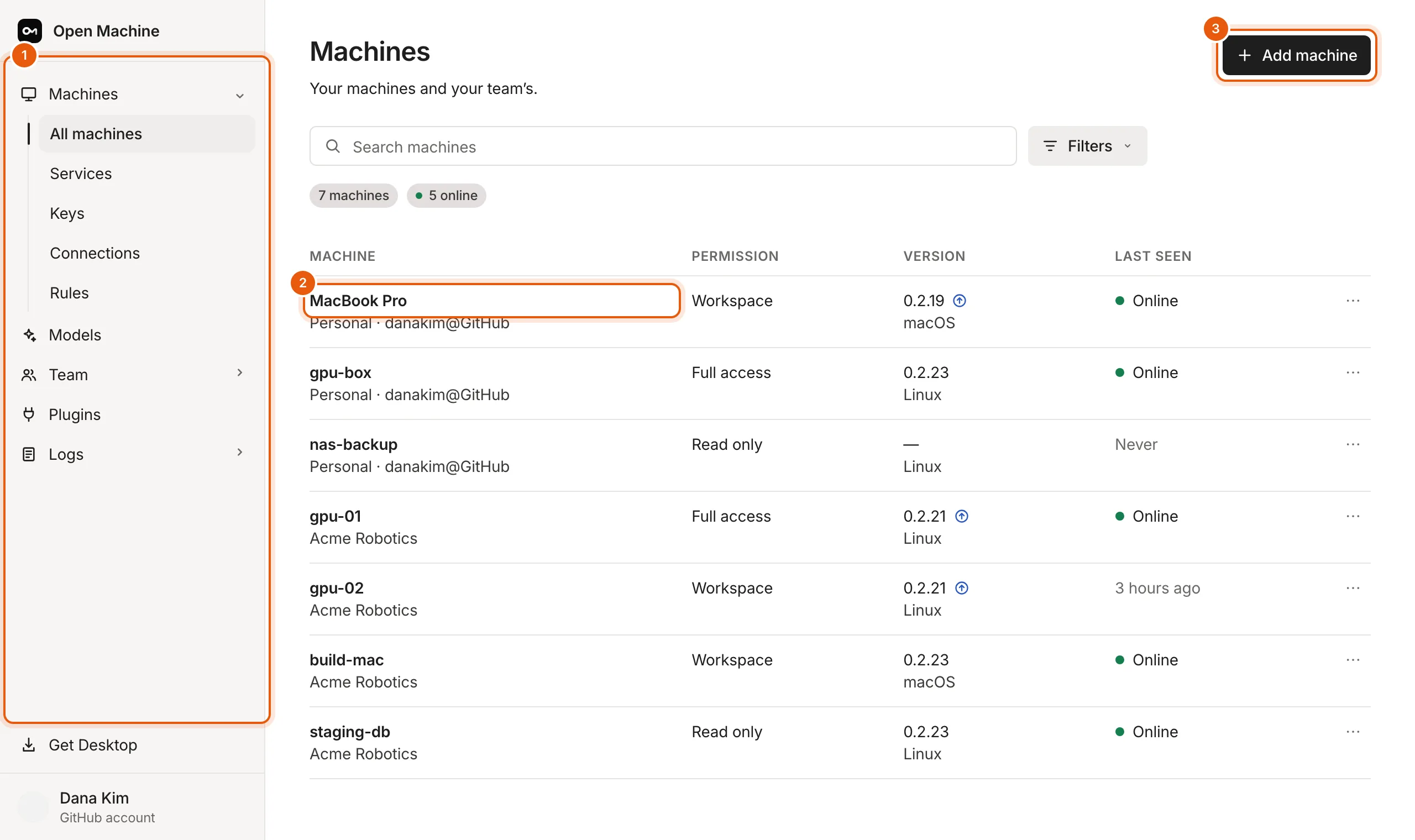
- The menu has a page for each part of Open Machine. Each has a page in these docs.
- Each machine you add shows here, with what agents may do on it and whether it is online.
- Add machine adds a Mac or a Linux machine.
Then, on any of your machines, an agent runs commands on another:
ssh gpu-box.om 'nvidia-smi'#Learn it in order
Each page starts with what most people need, and goes deeper further down.
#Get started
- Quickstart: Add two machines and run a command on one from the other, in about five minutes.
- How it works: What runs on your machines, what runs in the cloud, and what each one decides.
#Install
- Install on a Mac: Add a Mac to your account with the Open Machine app, and choose what agents may do on it.
- Install on Linux: Add a Linux machine with one command, from the Console or with a browser sign-in.
#Manage machines
- Machines: See every machine, its status and address, and rename, move, deactivate or remove one.
- Permissions: Choose what agents may do on each machine, Read only, Workspace or Full access, and how the machine enforces it.
- Rules: Block risky commands, allow only chosen ones, and protect files, at every permission level.
- Connections: Choose which machines can connect to which, one machine or group at a time.
#Use your machines
- Services: Open the web pages and use the programs running on your machines, such as ComfyUI, JupyterLab or a database.
- Models: Use the AI models running on any of your machines from apps on the computer you are using.
- GitHub: Let agents fetch, push and open pull requests from any of your machines, with no GitHub token on them.
#Teams and logs
- Teams: Share machines with other people, and choose who can use each one and how.
- Logs: See who connected to which machine and what ran, export it, and send it to your own tools.
#Reference
- om commands: Every om command on Linux, with its options and what it prints.
- Errors: What each error from the installer, om and the Console means, and how to fix it.
- Limits: How many machines, people, keys and invites an account can have, and how long things last.
- Glossary: One definition for each word these docs use.
#Help
- Troubleshooting: What to check when a machine does not connect, a command is refused, or a page will not open.
#Where things are
- The Console is the website where you manage machines, permissions, rules, teams, GitHub and logs.
- Your machines run
om, which connects them and checks every session. On a Mac, the Open Machine app runs it for you. See How it works.
#For AI agents
- Every page is Markdown at its own address with
.mdadded, such as /docs/quickstart.md. Each picture has a description that says what it shows. - A request for a page's address with
Accept: text/markdowngets the same Markdown. - /docs/llms.txt lists every page with one line each. /docs/llms-full.txt is every page in one file.